Install SQL Server
Connection Details
FMR requires a database to be specified on the first page of the Install Wizard. This can be changed at a later from the Administrator "Database Settings" page.
SQL Server by default uses port 1433.
If you wish to make a custom connection to SQL Server, the information you will likely need is:
| Connection String | Of the form: jdbc:sqlserver://[server url]:[server port];databaseName=[your database] e.g. jdbc:sqlserver://localhost:1433;databaseName=fusion_registry |
| Dialect | org.hibernate.dialect.SQLServerDialect |
| Class Name | com.microsoft.sqlserver.jdbc.SQLServerDriver |
Configuring SQL Server for Single Sign-On
FMR supports Single Sign-On (SSO) when connecting to a SQL Database. In order to use this feature, a DLL is also required.
The DLL can be obtained from Microsoft. You will need to download the "Microsoft SQL Server JDBC Drivers" package which contains a number of drivers named “sqljdbc_auth .dll” but for different systems (e.g. x86, 64 bit, etc.).
You need to locate the appropriate DLL for your system.
This DLL needs to be supplied to the Java Runtime running your Web Application Server. There are a number of ways in which this can be achieved. Two of the simplest methods are listed below: Copy the DLL file to the Java Runtime “bin” directory that is running your Web Application Server. It is important to place the DLL in the correct directory (for example: C:\Java\jdk1.8.0_92\jre\bin).
Note: that modifying a Java Runtime in this manner means that all applications that use this Java Runtime will be affected.
Pass the DLL location to the Web Application Server on server startup.
Locate the directory with the DLL you wish to add (e.g. c:\temp) then add the following line to setenv.bat and the Java library path will be modified allowing Tomcat to access the DLL file:
set CATALINA_OPTS=%CATALINA_OPTS% -Djava.library.path=C:\temp\SSO_DLL
Troubleshooting
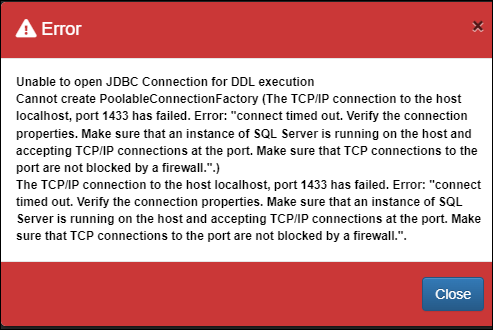
Any problems Fusion Metadata Registry encounters connecting to the database service will result in an error message. The example below indicates that the user credentials are wrong.