Configure FMR Database Access Through JNDI
This page explains how to configure Fusion Metadata Registry (FMR) to use a database connection that is registered in JNDI.
Using JNDI means the application server manages the database connection details instead of storing the JDBC URL, driver, and credentials directly in FMR. This is often useful when:
- you want Tomcat to manage connection pooling
- you want to keep database credentials outside the FMR application configuration
- you already manage shared database resources centrally in Tomcat
The setup has two parts:
- Register a JNDI
DataSourceresource in Apache Tomcat 10.1. - Configure FMR to use that registered resource.
Before you start
Make sure that:
- Apache Tomcat 10.1 is installed and running
- the target database schema already exists
- the JDBC driver JAR for your database is available to Tomcat, usually in the Tomcat
libdirectory
Step 1. Register the JNDI database resource in Tomcat 10.1
Tomcat must know about the database resource before FMR can use it.
Do this by adding a <Context> descriptor to the Tomcat configuration.
Example Tomcat <Context> descriptor
The example below defines a MySQL JNDI resource named fmrdatabase.
<Context>
  <Resource
    name="fmrdatabase"
    auth="Container"
    type="javax.sql.DataSource"
    driverClassName="com.mysql.cj.jdbc.Driver"
    url="jdbc:mysql://fmrdatabase:3306/fmr"
    username="root"
    password="password"
    maxTotal="10"
    minIdle="5"
    maxWaitMillis="-1"
    timeBetweenEvictionRunsMillis="7200000"
    minEvictableIdleTimeMillis="3600000"
    defaultAutoCommit="false" />
</Context>
Required resource properties
The Resource should include these values:
| Setting | Description |
|---|---|
name |
The JNDI resource name that FMR will use, for example fmrdatabase |
type |
Use javax.sql.DataSource |
driverClassName |
The JDBC driver class for the database |
url |
The JDBC connection URL |
username |
The database user, if required |
password |
The database password, if required |
JDBC driver class names
| Database | Driver class name |
|---|---|
| MySQL | com.mysql.cj.jdbc.Driver |
| Oracle | oracle.jdbc.driver.OracleDriver |
| SQL Server | com.microsoft.sqlserver.jdbc.SQLServerDriver |
Recommended connection pool settings
For non-JNDI connections, FMR uses the following defaults. It is sensible to mirror these values in the Tomcat resource unless your environment needs different pool settings.
| Setting | Value |
|---|---|
timeBetweenEvictionRunsMillis |
7200000 |
minEvictableIdleTimeMillis |
3600000 |
maxTotal |
10 |
minIdle |
5 |
defaultAutoCommit |
false |
maxWaitMillis |
-1 |
Where to place the <Context> descriptor in the Tomcat configuration
There are several ways to add the <Context> descriptor to the Tomcat configuration depending on the desired behaviour. Two options are:
$CATALINA_BASE/conf/context.xml: the Context will be loaded by all web applications.$CATALINA_BASE/conf/[enginename]/[hostname]/context.xml.default: the Context will be loaded by all web applications of that host.
Examples (assuming CATALINA_BASE=/opt/tomcat):
- /opt/tomcat/conf/context.xml
- /opt/tomcat/conf/Catalina/localhost/context.xml.default
Note
It is NOT recommended to place
Refer to the Apache Tomcat documentation for complete guidance.
Step 2. Configure FMR to use the JNDI resource
Once the JNDI resource has been registered in Tomcat, configure FMR to use it.
You can do this either:
- during installation on the database setup page
- later in Settings -> Server Settings -> Database
Select JNDI connection in the database type dropdown.
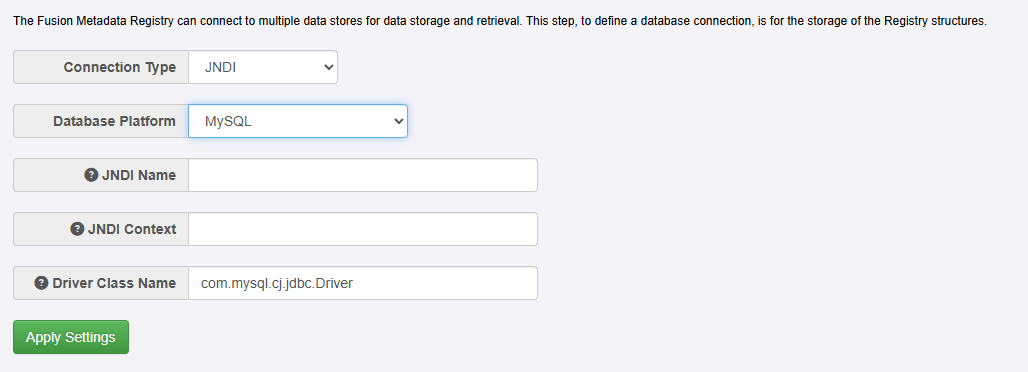
Enter the following values:
| FMR field | Value |
|---|---|
| Database Platform | Choose the database platform type - this also automatically sets the Driver Class Name |
| JNDI Name | The JNDI resource name exactly as defined in Tomcat, for example fmrdatabase |
| JNDI Context | For Apache Tomcat, use java:/comp/env |
| Driver Class Name | The JDBC driver class name |
FMR will combine these values to look up the registered Tomcat resource.
End-to-end example using Tomcat and MySQL
Determine the CATALINA_BASE
This is the base path for the Tomcat installation. For this example we'll assume CATALINA_BASE = /opt/tomcat
Create the Tomcat context
If it doesn't already exist, create the Tomcat context file /opt/tomcat/conf/context.xml, and add the following <Context> descriptor:
<Context>
  <Resource
    name="fmrdatabase"
    auth="Container"
    type="javax.sql.DataSource"
    driverClassName="com.mysql.cj.jdbc.Driver"
    url="jdbc:mysql://fmrdatabase:3306/fmr"
    username="root"
    password="password"
  />
</Context>
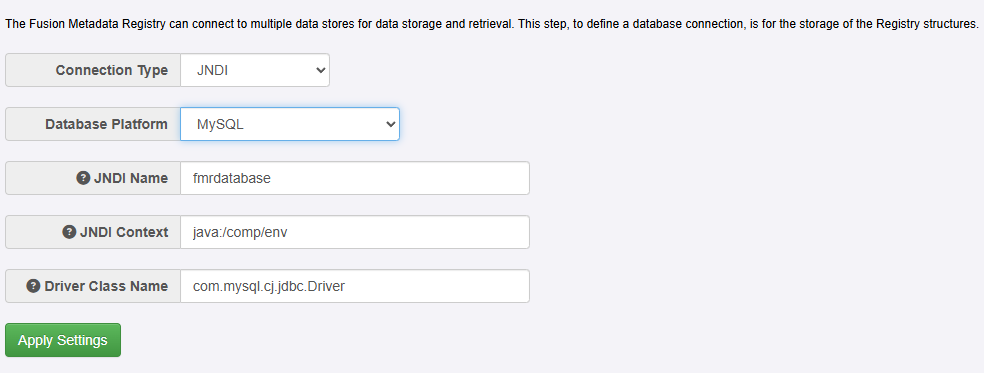
Configure the FMR database connection
As an administrator, configure the FMR database connection to use the fmrdatabase named resource:
Troubleshooting
Error: Unable to determine Java Driver class from JNDI information
This may appear with messages such as:
Unable to determine Java Driver class from JNDI information.
Cannot create JDBC driver of class 'oracle.jdbc.driver.OracleDriver' for connect URL 'jdbc:oracle:thin:@localhost:1521/orapdb1'
No suitable driver
Common causes:
- the required JDBC driver JAR is not available to Tomcat
- the JDBC
urlin the TomcatResourceis incorrect
For example, if you are using Oracle, ensure the appropriate Oracle JDBC driver JAR is present in the Tomcat lib directory.