Create a new semantically versioned structure
This page explains how to create new semantically versioned SDMX structural metadata artefacts.
Semantic versioning uses a three-part version number in the form major.minor.patch, for example 1.0.0. The version number also determines whether the structure is stable or draft. A stable version, such as 1.0.0, is immutable after publication. A draft version, such as 1.0.0-draft or 0.1.0, can continue to be changed while the model is being developed.
For the general rules on stable and draft structures, see Semantic versioning.
Choosing an approach
There are three methods for creating a new semantically versioned structure:
- Create the initial stable version directly.
- Create a draft of the intended initial version, develop it as needed and publish when ready.
- Create a zero-major draft, develop and publish in the same way as above.
Use the first option only when the structure is already agreed and ready to become a stable contract. Use one of the draft options when the structure still needs modelling, review, testing, or approval.
Option 1 - Create the initial stable version directly
This option creates a stable version of the structure immediately. It is suitable when the artefact has already been reviewed and you are ready to publish it for use by data providers, validation processes, or downstream consumers.
To use this approach, create the structure in the appropriate FMR structure creation wizard and enter a three-part version number with no extension. The normal initial version is 1.0.0, although any valid three-part semantic version can be used if your governance process requires a different starting point.
Complete the remaining wizard steps for the structure type you are creating, then save the structure. Once saved as a stable semantic version, the structure cannot be modified in place. Any later change must be made by creating a new version, and the new version number must follow the semantic versioning rules for the type of change made.
Option 2 - Create a draft of the intended initial version
This option creates a draft first, using the version number that you expect the stable structure to have later. It is usually the clearest approach when you know that the first stable release will be 1.0.0, but the content still needs to be developed.
To use this approach, create the structure with a three-part version number followed by an extension, for example 1.0.0-draft. The -draft extension identifies the structure as non-stable, so it can be edited freely while modelling work is in progress.
The version number should normally be the version number intended for the stable structure when it is published. Any valid extension may be used, but -draft is recommended because it makes the status of the artefact clear to other users.
While the structure is still a draft, continue to edit it as needed. When development, review, and approval are complete, publish the draft. Publication creates a stable structure from the draft.
The following screenshot shows publication of a draft structure in the web UI. The final version number defaults to the version number of the draft, but you may choose a different three-part version number during publication.
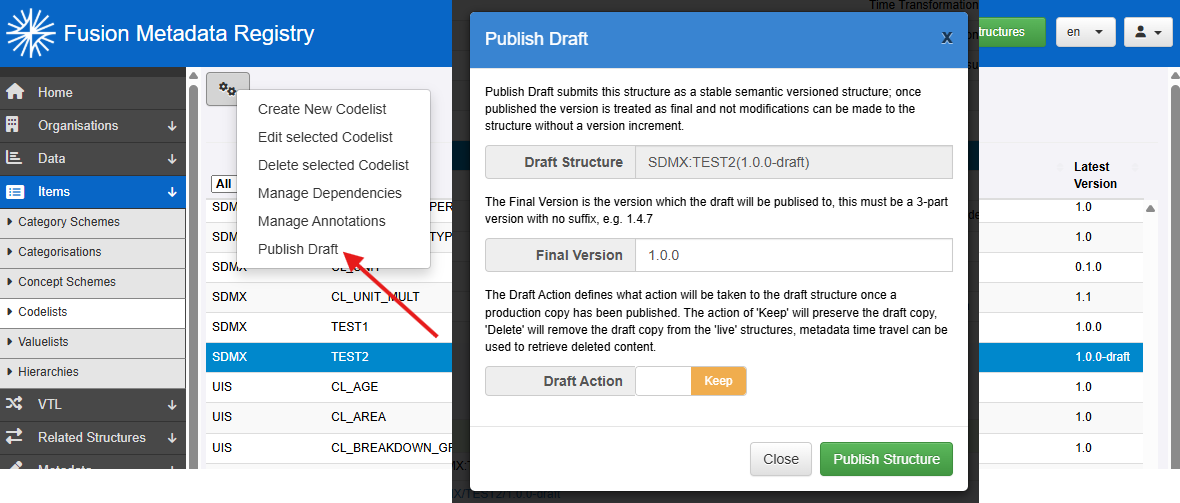
The final published version must be stable. It must not have an extension and must not have a zero major version number. For example, 1.0.0 is valid, but 1.0.0-rc.1 and 0.2.0 are not valid final publication versions.
You can also choose whether to preserve or remove the draft artefact after publication. If the draft is removed, it is removed only from the live artefacts. It can still be accessed using metadata time travel.
Option 3 - Create a zero-major draft
This option uses a major version of zero to show that the structure is still provisional. It is useful when early modelling work may go through several draft iterations before the first stable version number is chosen.
To use this approach, create the structure with a three-part version number whose major component is 0, for example 0.1.0 or 0.2.4. FMR treats these versions as non-stable drafts, even when they do not have an extension.
You may also use an extension with a zero-major version if that helps your local workflow, for example 0.1.0-releasecandidate. The extension can add useful information for users, but it does not change the structure's stable or draft status: any 0.y.z version is non-stable.
While the structure is non-stable, edit it as needed. When development is complete, publish the draft and choose the final stable version number at publication time.
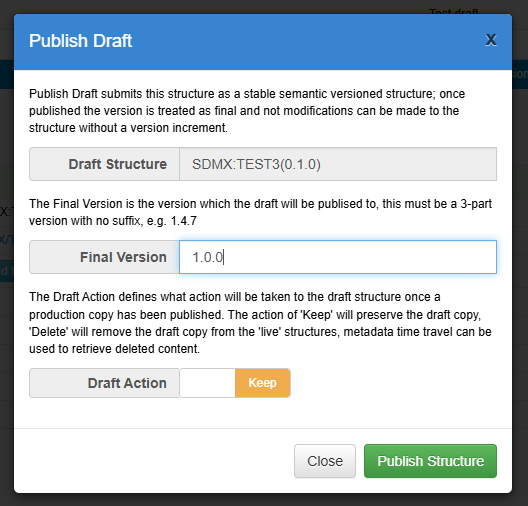
The following screenshot shows publication of a draft 0.1.0 structure as final version 1.0.0.